
Skip to content

Top 5 Coggle alternatives for modern mind mapping in 2026

If you are evaluating Coggle alternatives, you are probably balancing three things: speed, structure, and collaboration depth. Coggle is strong for quick online mind maps, but many teams compare other tools when pricing, workflow controls, or export flexibility start to matter more.
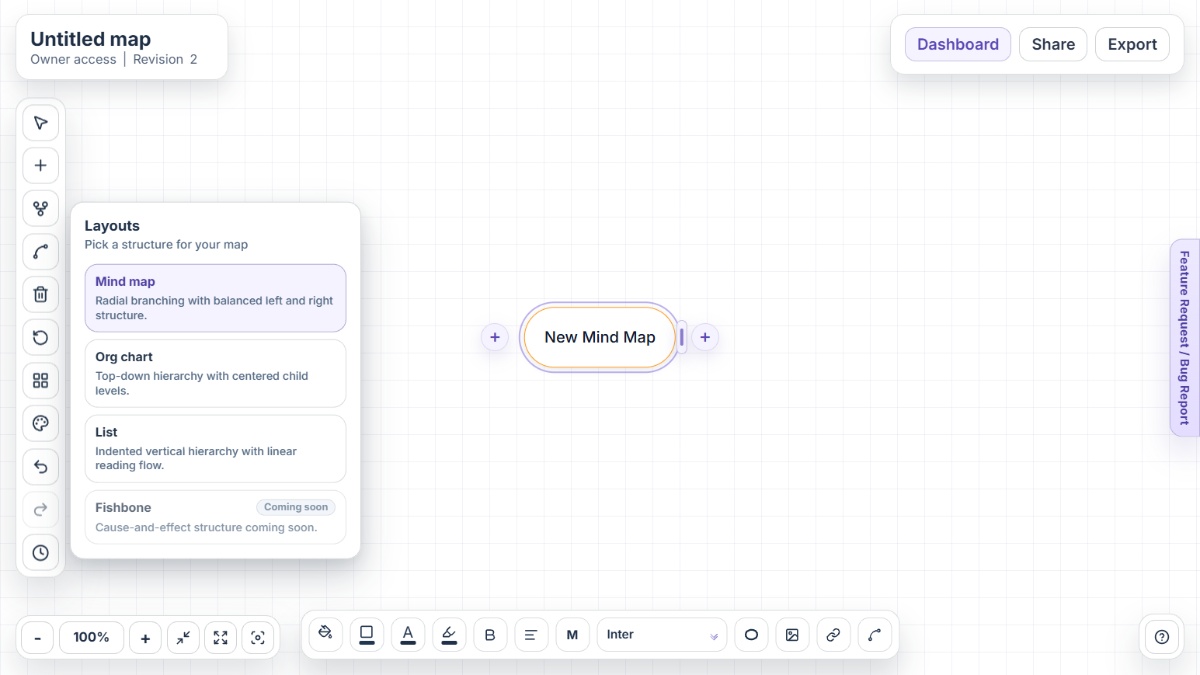
Mindmap-Maker interface showing mind map canvas with nodes, branches, and export options

Why people look for Coggle alternatives

Coggle remains a practical choice for lightweight visual thinking, but requirements often change once map usage becomes frequent and team workflows grow.

Private diagram limits can interrupt steady usage

Free Forever includes three private diagrams, which is enough for occasional use but limiting for students, consultants, or teams running many active mind maps.

Growing teams often need tighter workflow controls

As more collaborators join, teams usually need consistent ownership, folder structure, and permission practices to keep map libraries organized.

Feature needs diversify beyond basic branch mapping

Some users start with simple brainstorming, then need stronger options for presentation, alternate layouts, and structured handoff formats.

Budget planning shifts with paid feature adoption

Once privacy and advanced styling become core requirements, users often compare subscription value across dedicated mind map platforms.

Teams may want lower-friction startup paths

For quick idea sessions, many users prefer tools that open instantly and reduce account or setup overhead before the first branch is created.

Alternative 1Open Mindmap-Maker

Alternative #1: Mindmap-Maker

Mindmap-Maker is a no-signup, browser-first mind mapping tool designed for fast brainstorming, clear structure, and practical export workflows.

Key features

  • Instant no-signup start
  • Mind Map, Org Chart, and List layouts
  • Version history with restore
  • Role-based sharing with secure links
  • Export to PNG, JPG, SVG, PDF, Word, and HTML
  • Custom connections between any two nodes

Pros

  • Great for immediate brainstorming and concept mapping without account friction
  • Three layout modes support both creative and structured planning workflows
  • Export breadth helps teams hand off maps into docs, presentations, and archives

Cons

  • Teams deeply standardized on another ecosystem may need onboarding
  • Some organizations may still compare integration depth across their existing stack
  • Highly specialized enterprise governance workflows may require additional evaluation
Alternative 2Open MindMeister

Alternative #2: MindMeister

MindMeister is a dedicated online mind map platform focused on collaborative ideation, structured branches, and presentation-friendly map communication.

Key features

  • Collaborative editing
  • Template-driven map creation
  • Presentation mode
  • Task-oriented map elements
  • Import and export support
  • MeisterTask integration for task handoff

Pros

  • Focused mind map experience with straightforward navigation
  • Works well for classroom and team brainstorming sessions
  • Useful when moving from idea mapping toward task planning

Cons

  • Free-tier limits can be restrictive for regular usage
  • Advanced workflows generally require paid plans
  • Some governance capabilities are tier-dependent
Alternative 3Open Miro

Alternative #3: Miro

Miro is a broad visual collaboration platform with mind mapping, whiteboarding, diagramming, and workshop-friendly workflows on an infinite canvas.

Key features

  • Infinite canvas collaboration
  • Mind map and whiteboard workflows
  • Presentation and async sharing options
  • AI-assisted ideation
  • Large integration ecosystem
  • Template library for workshop workflows

Pros

  • Strong for cross-functional workshops and strategic planning
  • Good fit when maps coexist with other visual artifacts
  • Mature ecosystem for larger organizations

Cons

  • Can feel heavy for users who only need lightweight mind mapping
  • Board sprawl can require stronger governance habits
  • Plan and seat structure may increase cost at scale
Alternative 4Open XMind

Alternative #4: XMind

XMind is a dedicated mind mapping product known for rich map structures, strong visual output, and cross-device support.

Key features

  • Multiple diagram structures
  • Outline-style organization
  • Cross-device use
  • Presentation-ready themes
  • AI-assisted mapping
  • Web, desktop, and mobile support

Pros

  • Good for users who want deep control over map structure
  • Works well for personal planning and formal documentation
  • Supports teams that mix desktop and web usage

Cons

  • Feature depth can be more than lightweight users need
  • Workflow may require orientation for new contributors
  • Collaboration patterns vary by team setup
Alternative 5Open Lucidchart

Alternative #5: Lucidchart

Lucidchart is a collaborative diagramming platform where mind mapping sits alongside process diagrams, org charts, and system visuals.

Key features

  • Collaborative diagrams
  • Templates and shape libraries
  • AI-assisted diagram workflows
  • Data-linked visuals
  • Enterprise-ready integrations
  • Data linking and conditional formatting

Pros

  • Useful when teams need multiple diagram types in one place
  • Strong for process mapping and business documentation
  • Widely adopted in structured enterprise workflows

Cons

  • Mind mapping is part of a larger diagram suite
  • May feel heavier than dedicated map-first tools
  • Advanced setup can exceed simple brainstorming needs

Conclusion

Coggle is genuinely useful for quick, collaborative mind maps and flowchart-style thinking. If your team now needs stronger layout control, broader exports, or faster startup for repeated sessions, comparing alternatives is a practical move. Mindmap-Maker is the strongest instant map-first option, while MindMeister, Miro, XMind, and Lucidchart match different collaboration and diagramming priorities.

Other alternatives

FAQ

What is the best Coggle alternative for no-signup mind mapping?

Mindmap-Maker is a strong option if you want to open a browser and start mapping ideas immediately without account setup.

Is Coggle free to use?

Yes. Coggle's Free Forever plan is available, with three private diagrams and unlimited public diagrams listed on its pricing pages.

Does Coggle support real-time collaboration?

Yes. Coggle supports live collaborative editing, and users can also share diagrams by invitation, private links, and QR-based sharing methods.

Can Coggle diagrams be exported to other formats?

Coggle supports export options including PDF, image, plain-text outline, Freemind .mm, and Microsoft Visio .vsdx formats.

Why do teams move from Coggle to other mind map tools?

Common reasons include private diagram limits on the free plan, the need for different workflow depth, and changing collaboration or governance requirements.

Which alternative is better for mixed whiteboard and mind map workflows?

Miro is often chosen when teams need broad whiteboard collaboration in addition to mind maps, while Mindmap-Maker fits focused map-first workflows.