
Skip to content

Top 5 MindMeister alternatives for better mind mapping in 2026

Most people looking for MindMeister alternatives are dealing with the same question: stick with a familiar tool, or move to something that fits daily planning better. If map limits, collaboration style, or pricing value are now getting in the way, this guide gives you a practical side-by-side view of five strong options.
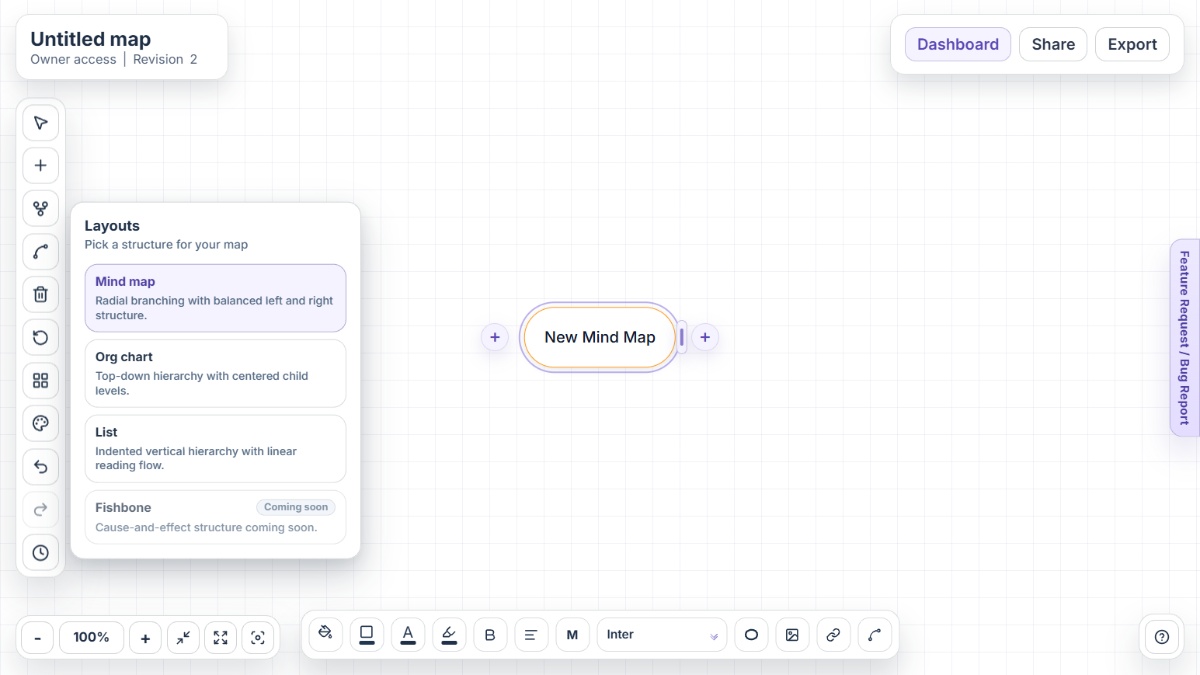
Mindmap-Maker interface showing mind map canvas with nodes, branches, and export options

Why people look for MindMeister alternatives

MindMeister is still a popular choice, but teams often revisit their options once usage grows and planning workflows become more demanding. The most common triggers are plan limits, export needs, and collaboration model fit.

Free plan map limits arrive quickly

The Free tier includes 3 mind maps. For active note-taking, research mapping, and recurring planning sessions, that ceiling can appear in the first week.

Unlimited usage and exports are paid

Users who need unlimited maps, file exports, and deeper administration typically compare paid plans against alternatives that expose more core capabilities upfront.

History depth varies by plan

Version history appears as 7 days in Personal and all-time in higher tiers, which matters for teams that depend on reliable rollback and long-running documentation.

Attachments and content limits influence team workflows

When maps become document hubs, attachment constraints on lower plans can create friction for teams that rely on visuals, files, and context-rich branches.

Some teams prefer no-signup, browser-first tools

Account-based, per-user subscriptions work well for many organizations, but some users prefer a simpler workflow that starts instantly without onboarding overhead.

Alternative 1Open Mindmap-Maker

Alternative #1: Mindmap-Maker

Mindmap-Maker is a browser-based mind map tool built for fast idea capture, structured planning, and clean exports without signup friction.

Key features

  • No-signup editing with instant access
  • Three layouts: Mind Map, Org Chart, and List
  • Version history with restore flow
  • Secure link sharing with role controls
  • Export to PNG, JPG, SVG, PDF, Word, and HTML
  • Custom connections between any two nodes

Pros

  • Zero-signup start is ideal for quick brainstorming sessions
  • Layout switching helps the same map serve planning and presentation
  • Strong export breadth for handoffs across docs and slides

Cons

  • Browser-first workflow may not suit teams that require native desktop apps
  • Teams deeply tied to proprietary suite integrations may need adaptation
  • Template ecosystems are still smaller than some long-established platforms
Alternative 2Open Miro

Alternative #2: Miro

Miro approaches mind mapping inside a broader visual collaboration workspace with infinite canvas, presentation tools, and enterprise integrations.

Key features

  • Mind mapping on an infinite canvas
  • Real-time and async collaboration
  • Presentation mode and Talktrack
  • AI-assisted branch generation
  • Large integration marketplace
  • Template library for workshop workflows

Pros

  • Very strong for cross-functional workshops and collaborative ideation
  • Works well when mind maps sit next to whiteboarding and planning artifacts
  • Wide integration coverage supports enterprise toolchains

Cons

  • A broad whiteboard environment can feel heavier for pure mind mapping
  • Teams may need clearer board governance as canvases grow
  • Account-based onboarding is still required before use
Alternative 3Open Coggle

Alternative #3: Coggle

Coggle is a web-based mind map and flowchart tool focused on fast collaboration, visual simplicity, and branch-based thinking.

Key features

  • Realtime collaboration
  • Full change history
  • Loops and joined branches
  • Multiple starting points
  • Flowcharting support
  • Browser-based mind mapping access

Pros

  • Simple interface keeps brainstorming sessions fast
  • History tracking is straightforward and easy to use
  • Branch loops are useful for process-heavy maps

Cons

  • Private diagram scale is tied to paid plans
  • Advanced controls are concentrated in higher tiers
  • Teams needing broader enterprise governance may require extra tooling
Alternative 4Open XMind

Alternative #4: XMind

XMind is a dedicated mind mapping platform emphasizing native-feeling apps, flexible structures, AI-assisted workflows, and cross-device use.

Key features

  • Web, desktop, and mobile availability
  • Outliner view for linear editing
  • AI workspace and AI mapping features
  • Real-time collaboration and shared spaces
  • Multiple visual structures beyond classic mind maps
  • Web, desktop, and mobile support

Pros

  • Focused mind mapping experience with strong structural flexibility
  • Cross-device availability supports mixed work environments
  • Security and privacy messaging is prominent for enterprise buyers

Cons

  • Feature set can feel dense for users who only need lightweight maps
  • Some workflows are emphasized as web-first in current messaging
  • Teams may need policy decisions before adopting AI-heavy workflows
Alternative 5Open Lucidchart

Alternative #5: Lucidchart

Lucidchart is an intelligent diagramming platform that supports collaborative visual documentation across process maps, org structures, and technical systems.

Key features

  • Real-time diagram collaboration
  • Lucid AI-assisted generation
  • Data linking and conditional formatting
  • Templates and shape libraries
  • Broad integration support
  • Lucid AI-assisted workflows

Pros

  • Strong fit for teams managing multiple diagram types in one platform
  • Enterprise integration and admin capabilities are mature
  • Useful when mind maps are part of larger process documentation

Cons

  • Mind mapping is one use case inside a broader diagramming suite
  • Setup depth can be higher than lightweight mind map tools
  • Teams seeking a pure mind map-first UX may prefer a narrower product

Conclusion

MindMeister can still work well for many teams, especially when the current limits are acceptable. But if your workflow now needs faster startup, broader export freedom, or a different collaboration shape, switching can remove real day-to-day friction. Mindmap-Maker is the strongest fit for instant no-signup mapping, while Miro, Lucidchart, Coggle, and XMind each serve different planning styles.

Other alternatives

FAQ

What is the best MindMeister alternative for no-signup mind mapping?

Mindmap-Maker is a practical option if your priority is opening the app and mapping immediately without account setup.

Why do users switch from MindMeister after trying the free plan?

A common trigger is the 3-map limit on the free tier, especially for users who map daily for study, planning, or project work.

Does MindMeister support collaboration?

Yes. MindMeister supports real-time collaboration, including sharing by invite or link with view and edit permissions.

Can MindMeister export maps to common formats?

MindMeister lists export support for formats such as PNG, PDF, and Word, with export capabilities tied to plan availability.

Which alternative is best when teams also need whiteboarding?

Miro is often chosen when teams want mind mapping and whiteboarding together on a shared infinite canvas.

Which option is best for dedicated mind map workflows?

Mindmap-Maker, Coggle, and XMind are often shortlisted by users who prefer a mind map-centric workflow over a broad diagram suite.