
01
Fast map creation and editing
Start instantly, add nodes quickly, and keep ideas moving without account friction or tool switching.
Mindmap-Maker is a free mind mapping tool for brainstorming, project planning, and idea organization. Use it as your online brain map maker to structure concepts, share by link, and export with no sign-up.
Core capabilities
Use these capabilities as one workflow: capture ideas quickly, shape clear structure, share with control, and export to the format your audience needs.
01
Start instantly, add nodes quickly, and keep ideas moving without account friction or tool switching.
02
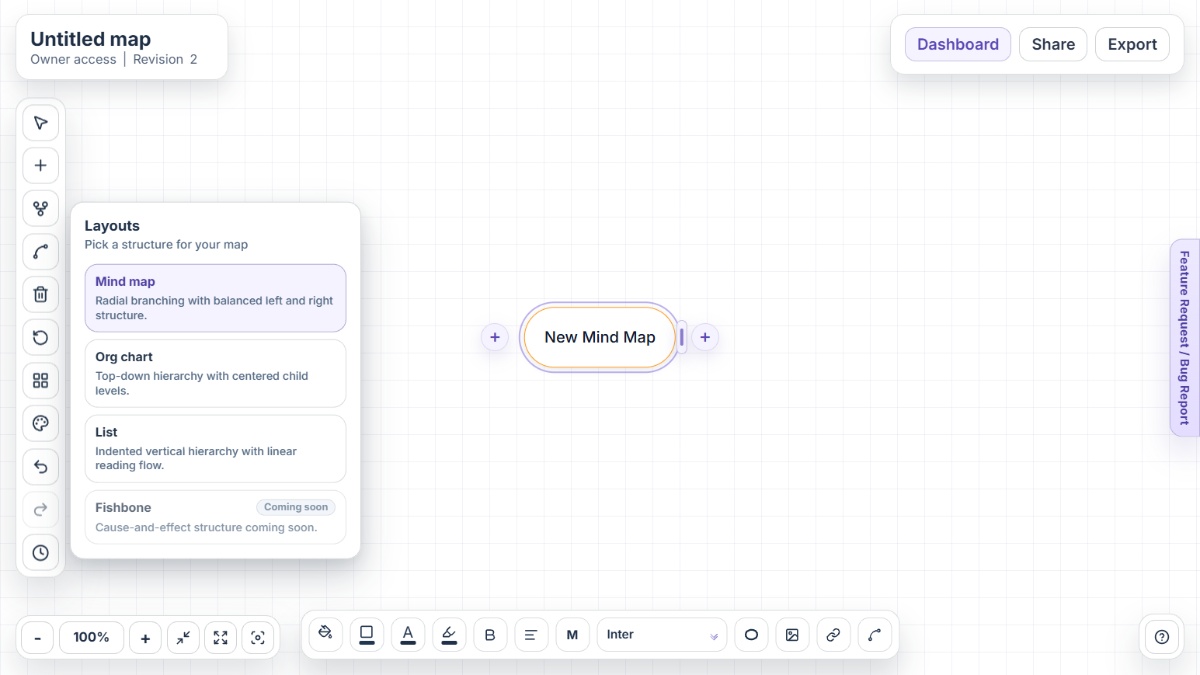
Use Mind Map, Org Chart, or List layouts when the same content needs a different visual structure.
03
Connect related ideas across branches and add note-style nodes when you need extra context.
04
Search across nodes, links, and sticky notes, then add trusted URLs with protocol validation.
05
Share by unique link with viewer or editor access, optional password protection, and expiry controls.
06
Restore previous revisions and export maps as PNG, JPG, SVG, PDF, HTML outline, or Word.
Use cases
Mindmap-Maker supports both beginner and advanced workflows, so each audience can adapt the same tool to different planning goals.
Students
Use Mindmap-Maker to break large subjects into chapters, concepts, and revision tasks, then switch to List layout for checklist-style review.
Professionals
Use Mindmap Maker to connect goals, dependencies, decisions, and owners in one visual model that can be shared and exported for execution.
Teams
Use Mindmap-Maker links to collaborate asynchronously, then preserve accountability with version history and predictable export options.
Educators
Use Mindmap Maker to structure lessons from core topic to examples, activities, and assessments in a format learners can follow quickly.
Researchers
Use Mindmap-Maker to map literature, themes, and evidence clusters so complex information stays organized and easier to review.
SMBs
Use Mindmap Maker to plan services, workflows, marketing ideas, and internal processes in one visual system your team can actually use.
Light comparison
This is not a negative comparison. It is a workflow comparison: fewer barriers to start, fewer rebuilds later, and stronger continuity from ideation to delivery.
Mindmap-Maker includes layout modes, secure sharing, history, search, and export in one free workflow, while many premium tools split these across pricing tiers.
Mindmap Maker helps you go from idea map to stakeholder-ready output without rebuilding content across separate apps or duplicate files.
Mindmap-Maker keeps sharing simple with token links, optional passwords, and expiry controls, so access can be managed without account friction.
FAQ
Mindmap-Maker combines no-sign-up access, multiple layouts, secure link sharing, find-in-map search, version history, and multi-format export in one free browser app.
Yes. Mindmap Maker is fully free with no premium plan, no ads, and no locked features, so every user gets the complete feature set.
Yes. Start in Mind Map layout for idea generation, switch to Org Chart for hierarchy review, and use List layout for action-oriented planning.
You can generate a unique share link with viewer or editor access, then optionally protect that link with a password and expiry date.
Mindmap-Maker supports PNG, JPG, SVG, PDF, HTML outline, and Microsoft Word export so maps can move into slides, docs, and review workflows.
Yes. Mindmap Maker includes version history with preview and restore so you can roll back safely when maps change during planning.
Yes. The editor is designed to be simple for first-time users while still supporting advanced workflows like custom connections, safe links, and export controls.
Open Mindmap-Maker instantly and turn ideas into structured, shareable plans in minutes.